
จัดการข้อความขาเข้า
An inbound message is an email delivered to an NightPOS database. Anyone can send an email to an email alias created in the database or reply to an email that was previously sent from the database based on the reply-to header.
ชื่ออีเมล
ชื่อเฉพาะรุ่น
แอปพลิเคชันบางตัวมีชื่อเฉพาะของตัวเอง (ทีมขาย ทีม Helpdesk โปรเจ็กต์ ฯลฯ) ชื่อเหล่านี้ใช้เพื่อ:
สร้างบันทึกเมื่อส่งอีเมลโดยตรงถึงชื่ออีเมล
รับการตอบกลับอีเมลที่ส่งครั้งแรกจากบันทึก
Example
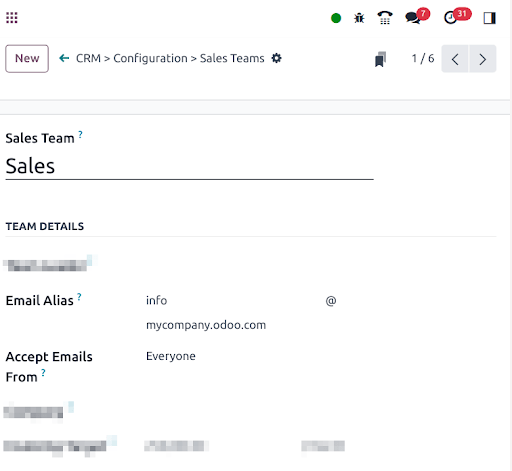
In the example displayed above, sending an email to info@company-name.nightpos.com will create a
new opportunity or a new lead automatically assigned to the corresponding sales team. If an email
is sent from the chatter of an existing opportunity, the reply-to will be
info@company-name.nightpos.com. The reply will be posted in the right chatter, according to the
message-id header.
จับทั้งหมด
หากแอปพลิเคชันไม่มีนามแฝง จะใช้นามแฝงสำรองทั่วไป: catchall อีเมลที่ส่งจากช่องแชทจะมีที่อยู่ตอบกลับที่ตั้งค่าเป็นนามแฝง catchall นี้ คำตอบที่ส่งไปยัง catchall จะถูกโพสต์ไปยังช่องแชทที่ถูกต้องด้วยส่วนหัว message-id
โดยค่าเริ่มต้น จะใช้ local-part catchall เปิดใช้งาน โหมดนักพัฒนา และไปที่ เพื่อเข้าถึงการกำหนดค่า
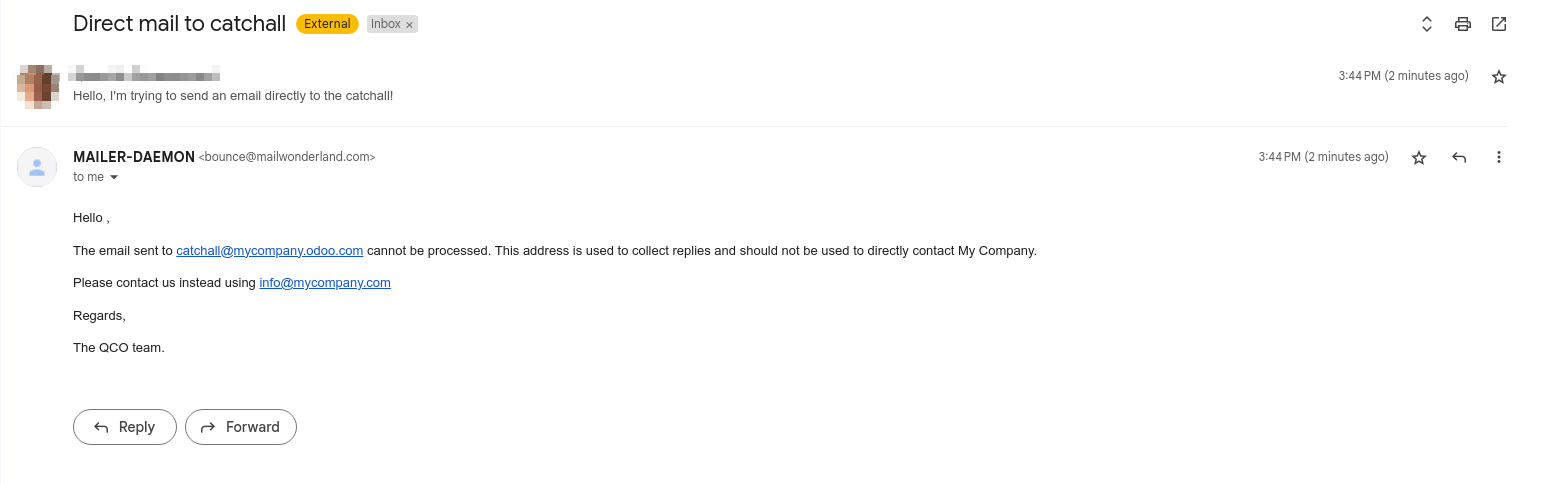
อีเมลที่ส่งไปยัง Catchall จะต้องเป็นการตอบกลับอีเมลก่อนหน้าที่ส่งจากฐานข้อมูลเสมอ หากอีเมลถูกส่งโดยตรงไปยัง Catchall ผู้ส่งจะได้รับข้อความต่อไปนี้:
Note
ที่อยู่อีเมล info@company-name.com ที่แสดงในภาพหน้าจอด้านบนคือที่อยู่อีเมลที่ตั้งค่าไว้สำหรับบริษัท เมื่อเข้าสู่โหมดนักพัฒนาในโปรไฟล์บริษัท ตัวเลือกการกำหนดค่าเพิ่มเติม (เช่น catchall และการตีกลับ) จะสามารถอ่านได้ คุณสามารถปรับเปลี่ยนได้โดยคลิกที่ลิงก์ภายในของโดเมนอีเมล โดยทั่วไปไม่แนะนำให้ปรับเปลี่ยนตัวเลือกเหล่านี้ เว้นแต่จะมีความต้องการเฉพาะ เนื่องจากจะส่งผลต่อการตอบกลับอีเมลที่ส่งไปก่อนหน้านี้ทั้งหมด
Example
An alias can be configured on a sales team in the CRM app. When a customer replies to an email
coming from the CRM app, the reply-to is info@company-name.nightpos.com.
When an email is sent from the Contact app, the reply address is catchall@company-name.nightpos.com
because there is no alias on the contact model.
Note
ขอแนะนำให้คง local-part ของ catchall และค่าการตีกลับไว้ไม่เปลี่ยนแปลง หากแก้ไขค่านี้ อีเมลที่ส่งจากฐานข้อมูลก่อนหน้านี้จะยังคงมีค่า local-part เดิมอยู่ ซึ่งอาจส่งผลให้ระบบไม่รับคำตอบกลับในฐานข้อมูลอย่างถูกต้อง
การตีกลับ
ในลักษณะเดียวกัน ชื่อ catchall จะใช้เพื่อสร้างที่อยู่ตอบกลับ ชื่อการตีกลับจะใช้เพื่อสร้าง return-path ของอีเมล return-path จะใช้เมื่อไม่สามารถส่งอีเมลถึงผู้รับได้และมีข้อผิดพลาดส่งกลับไปยังผู้ส่ง
โดยค่าเริ่มต้น ชื่อ การตีกลับ จะถูกนำมาใช้ เปิดใช้งาน โหมดนักพัฒนา และไปที่ เพื่อเข้าถึงการกำหนดค่า
Note
On NightPOS Online, when using the default outgoing email server, the return-path address is forced
to the value bounce@company-name.nightpos.com independently of the value set as bounce alias.
When an error occurs, a notification is received and displayed in a red envelope in the chatter. In
some cases, the red envelope can just contain a no error message, meaning there is an error that
could not be handled by NightPOS.
ระบบจะแสดงการแจ้งเตือนในไอคอนแชทบนแถบนำทางด้วย
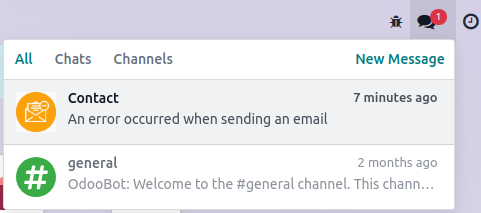
Example
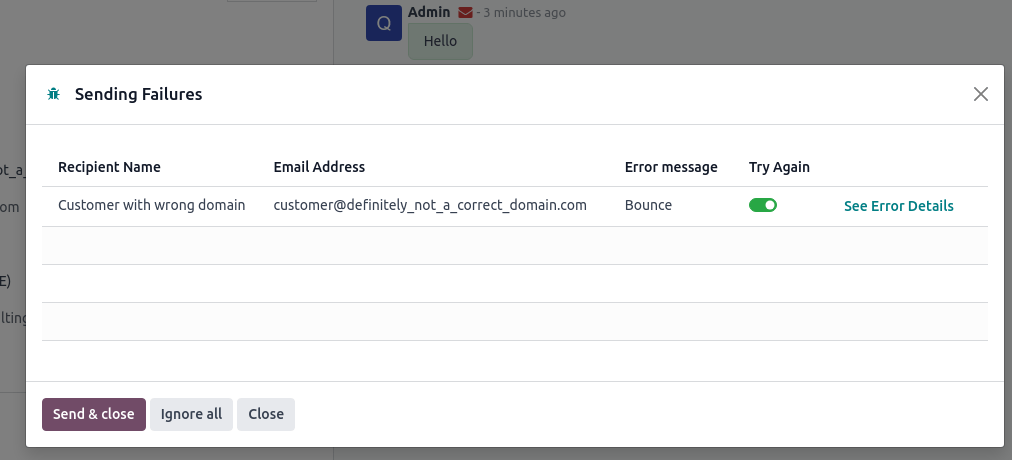
หากที่อยู่อีเมลของผู้รับไม่ถูกต้อง โดยการคลิกบนซองจดหมายสีแดงในช่องแชท จะได้รับข้อความแสดงข้อผิดพลาดพร้อมสาเหตุของความล้มเหลว
Receive emails with NightPOS's default configuration
On NightPOS Online and NightPOS.sh, the email alias, reply, and bounce addresses are pre-configured. These addresses use the alias domain automatically added to a standard database.
Example
Assuming the database URL is https://mydatabase.nightpos.com, the alias domain
mydatabase.nightpos.com is automatically created. Catchall and bounce can be used and their address
is respectively catchall@mydatabase.nightpos.com, and bounce@mydatabase.nightpos.com.
If the CRM app is installed, and a sales team with the alias info is created, the
info@mydatabase.nightpos.com address can be used immediately. The same goes for any other alias
created in other applications.
โดเมนฐานข้อมูลพร้อมที่จะใช้ในการรับอีเมลโดยไม่ต้องกำหนดค่าเพิ่มเติม
Use multiple NightPOS subdomains
On NightPOS Online, the only NightPOS subdomain is the one defined at the database creation.
On NightPOS.sh, it is possible to use several NightPOS subdomains. In the settings of the branch, additional NightPOS subdomains can be added as long as they are not used yet in another branch. These domains must then be added to the alias domains to be used by a company.
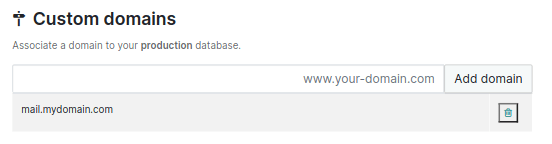
ใช้โดเมนที่กำหนดเองสำหรับข้อความขาเข้า
ต้องเลือก ชื่อ โดเมนในการตั้งค่าทั่วไป หากคุณมีบริษัทหลายแห่ง คุณต้องกำหนดค่าแต่ละบริษัท
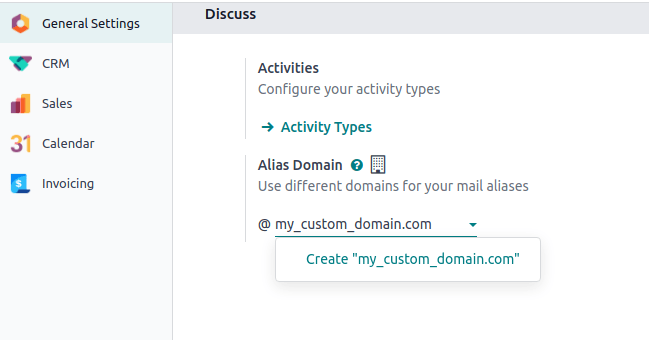
ชื่อทั้งหมดจะใช้โดเมนที่กำหนดเองนี้ การตอบกลับโมเดลที่มีการกำหนดค่าชื่อจะส่งไปที่ [alias]@my-custom-domain.com การตอบกลับโมเดลอื่นๆ จะถูกส่งไปยัง catchall ผ่าน catchall@my-custom-domain.com
Important
If emails are sent using NightPOS's email servers while using a custom domain, follow the "Using a custom domain with NightPOS’s email server" instructions.
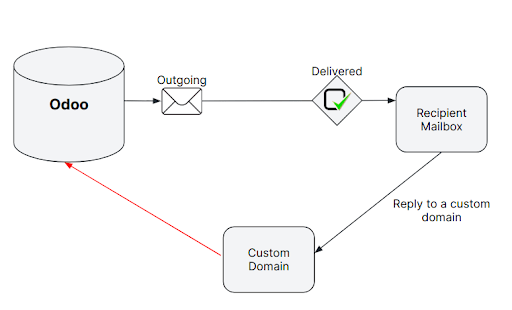
Since this custom domain is used, all emails using an alias (replies, bounces and direct sends) are sent to an address of the domain. They are thus delivered to the email server linked to the domain (MX record). To display them in the chatter or to create new records, it is necessary to retrieve these incoming emails in the NightPOS database.
วิธีการ |
สิทธิประโยชน์ |
ข้อเสีย |
|---|---|---|
ตั้งค่าได้ง่าย อีเมลจะถูกส่งไปยังฐานข้อมูลโดยตรง |
จำเป็นต้องกำหนดค่าชื่อแต่ละอันของฐานข้อมูล |
|
ช่วยให้สามารถเก็บสำเนาอีเมลไว้ในกล่องจดหมายของคุณ (ด้วย IMAP) ช่วยให้สามารถสร้างบันทึกในรูปแบบที่เลือกได้ |
ขึ้นอยู่กับ CRON ซึ่งหมายความว่าอีเมลจะไม่ถูกดึงข้อมูลในฐานข้อมูลทันที จำเป็นต้องกำหนดค่าชื่อของฐานข้อมูลแต่ละแห่ง |
|
ต้องสร้างเพียงบันทึกเดียวเพื่อให้ชื่อทั้งหมดทำงานอย่างถูกต้อง |
จำเป็นต้องใช้โดเมนย่อย ต้องมีความรู้ด้านเทคนิคขั้นสูง |
Important
สำหรับ ฐานข้อมูล on-premise วิธีการเปลี่ยนเส้นทางและบันทึก MX ยังต้องกำหนดค่า สคริปต์เกตเวย์เมล การดำเนินการตามสคริปต์นี้ต้องมีความรู้ด้านเทคนิคและโครงสร้างพื้นฐานขั้นสูง
Important
โปรดดูเอกสารของผู้ให้บริการของคุณสำหรับข้อมูลโดยละเอียดเพิ่มเติมเกี่ยวกับวิธีการจัดการวิธีการโดยละเอียดด้านล่าง
การเปลี่ยนเส้นทาง
If the database is hosted on NightPOS Online or NightPOS.sh, using redirections is recommended. They allow messages to be received without delay in the database.
Warning
When configuring email redirections with Microsoft 365 (Exchange Online), be aware that certain technical limitations may affect your setup. Some users have reported that Microsoft 365 does not support true redirection and only allows forwarding, which may not behave as needed for NightPOS's email routing.
สำหรับข้อมูลเพิ่มเติมเกี่ยวกับการกำหนดค่า Microsoft Exchange โปรดไปที่ Microsoft Learn
It is mandatory to redirect the catchall and bounce address to the NightPOS subdomain of the database. Every other alias used must be redirected as well.
Example
ด้วยทีมขายเพียงทีมเดียว จำเป็นต้องมีการเปลี่ยนเส้นทางดังต่อไปนี้:
catchall@company-name.com→catchall@company-name.nightpos.combounce@company-name.com→bounce@company-name.nightpos.cominfo@company-name.com→info@company-name.nightpos.com
Important
ผู้ให้บริการบางรายขอให้ตรวจสอบการเปลี่ยนเส้นทางโดยส่งลิงก์ไปยังที่อยู่อีเมลเป้าหมาย ขั้นตอนนี้เป็นปัญหาสำหรับ catchall และการตีกลับเนื่องจากไม่ได้ใช้เพื่อสร้างบันทึก
แก้ไขค่า catchall บนโดเมนชื่ออีเมล โหมดนักพัฒนา ต้องเปิดใช้งานเพื่อเข้าถึงเมนูนี้ ตัวอย่างเช่น สามารถเปลี่ยนจาก
catchallเป็นtemp-catchallได้ ซึ่งจะทำให้สามารถใช้catchallเป็น local-part ของชื่ออื่นได้เปิดแอปที่ใช้ชื่อแทน ตัวอย่างเช่น CRM มีชื่อสำหรับทีมขายแต่ละทีม ตั้งค่า
catchallให้เป็น local-part ของชื่อของทีมขายอีเมลตรวจสอบจะสร้างบันทึกในแอป CRM อีเมลที่ส่งจะปรากฏในช่องแชท ทำให้คุณสามารถตรวจสอบการเปลี่ยนเส้นทางได้
อย่าลืมเปลี่ยนชื่อเล่นของทีมขายและค่า catchall บนโดเมนชื่ออีเมลกลับเหมือนกับก่อนดำเนินการนี้
ทางเลือกอื่นสำหรับการเปลี่ยนเส้นทางคือ การส่งต่อ สำหรับการส่งต่อ ที่อยู่อีเมลที่ส่งต่อจะถูกระบุว่าเป็นผู้ส่ง ในขณะที่การเปลี่ยนเส้นทาง ผู้ส่งเดิมจะยังคงอยู่เสมอ
Important
เมื่อใช้การเปลี่ยนเส้นทางอีเมลเพื่อจัดการข้อความขาเข้า อาจต้องกำหนดค่าเพิ่มเติมเพื่อให้แน่ใจว่าทำงานได้อย่างถูกต้อง
ผู้ให้บริการอีเมลบางราย เช่น Gmail ต้องการให้ยืนยันที่อยู่เปลี่ยนเส้นทางอย่างชัดเจนก่อนที่อีเมลจะถูกส่งต่อ มิฉะนั้นการเปลี่ยนเส้นทางอาจไม่ทำงาน
In addition, when redirection is used instead of an incoming mail server, the alias may appear
with the @yourdb.nightpos.com domain unless Local-part based incoming detection is enabled on the
corresponding alias. This setting can be found under .
เซิร์ฟเวอร์เมลขาเข้า
As mentioned earlier, using redirections is the recommended method to receive emails in NightPOS. However, it is also possible to set up incoming mail servers. Using this method means creating an incoming email server for each mailbox on your server, catchall, bounce, and every alias of the database, in order to fetch all incoming emails.
Warning
NightPOS's Incoming Mail Servers feature is designed for shared inboxes (e.g.,
sales@yourcompany.com or support@yourcompany.com) to route messages to team pipelines,
tickets, or documents.
ไม่ แนะนำให้ใช้ที่อยู่อีเมลส่วนบุคคล (เช่น mitchell.admin@yourcompany.com) เป็นเซิร์ฟเวอร์อีเมลขาเข้า การทำเช่นนั้นอาจนำไปสู่ความเสี่ยงด้านความปลอดภัยที่เพิ่มขึ้น การกำหนดเส้นทางข้อความที่ไม่ได้ตั้งใจ ปัญหาความเป็นส่วนตัว และความยากลำบากในการซิงค์การตอบกลับอย่างถูกต้อง
เซิร์ฟเวอร์อีเมลขาเข้าถูกสร้างขึ้นโดยไปที่
Important
เราแนะนำให้ใช้โปรโตคอล IMAP มากกว่าโปรโตคอล POP เนื่องจาก IMAP จะดึงอีเมลทั้งหมดที่ไม่ได้อ่าน ในขณะที่ POP จะดึงประวัติอีเมลทั้งหมดแล้วแท็กอีเมลเหล่านั้นว่าถูกลบแล้วในกล่องจดหมายของคุณ
Tip
นอกจากนี้ยังสามารถเชื่อมต่อกล่องจดหมายผ่าน Gmail กับ Google OAuth หรือ Outlook กับ Microsoft Azure OAuth ได้อีกด้วย
ไม่ว่าจะเลือกโปรโตคอลใดก็ตาม อีเมลจะถูกดึงข้อมูลโดยใช้การดำเนินการตามกำหนดเวลาของ เมล: บริการ Fetchmail
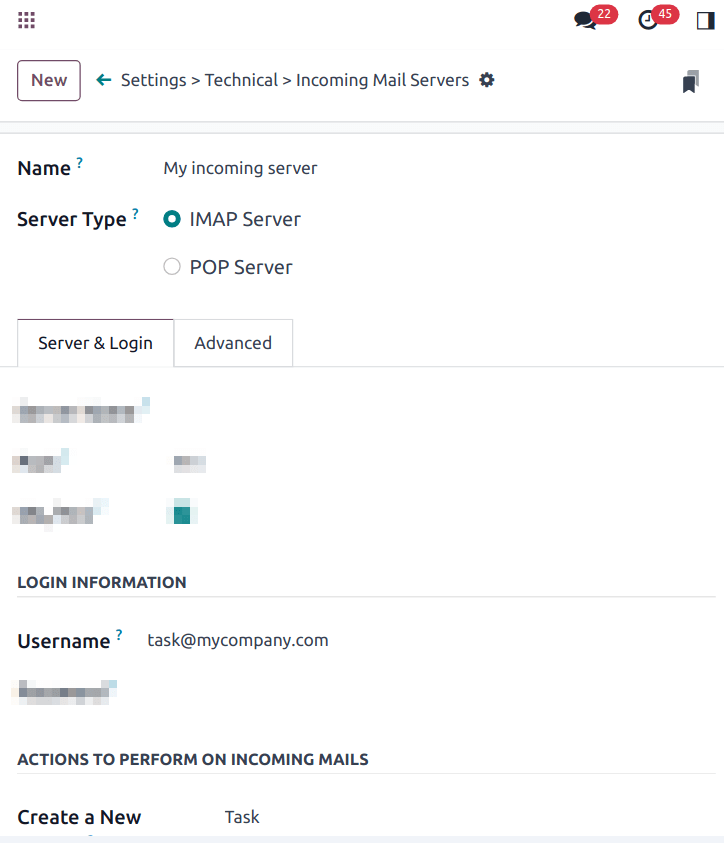
Additionally, using an incoming mail server in NightPOS gives the opportunity to create new records in a specified model. Each incoming mail server can create records in a different model.
Example
Emails received on task@company-name.com are fetched by the NightPOS database. All fetched emails
will create a new project task in the database.
บันทึก MX
ตัวเลือกที่สามคือการสร้างระเบียน MX ในโซน DNS ของคุณ ซึ่งจะระบุเซิร์ฟเวอร์อีเมลที่จัดการอีเมลที่ส่งไปยังโดเมนของคุณ จำเป็นต้องมีความรู้ด้านเทคนิคขั้นสูง
Important
This configuration only works with a subdomain on the NightPOS Online or NightPOS.sh infrastructure
(e.g., @mail.mydomain.com). Point the MX record from the custom subdomain to the NightPOS
subdomain of your database, e.g., from mail.mydomain.com to dbname.nightpos.com.
ด้านล่างนี้เป็นข้อมูลเฉพาะบางส่วนที่ขึ้นอยู่กับประเภทของโฮสติ้ง:
The custom subdomain must be added to your NightPOS Portal.
The custom subdomain must be added to the settings of the project:
ลูปการส่งเมลได้ไม่จำกัดจำนวน
In some cases, infinite mailing loops can be created. NightPOS provides some protection against such loops, ensuring the same sender cannot send too many emails that would create records to an alias in a specific time span.
ตามค่าเริ่มต้น ที่อยู่อีเมลสามารถส่งอีเมลได้สูงสุด 20 ฉบับใน 120 นาที หากส่งอีเมลมากกว่านี้ อีเมลเหล่านั้นจะถูกบล็อกและผู้ส่งจะได้รับข้อความต่อไปนี้:
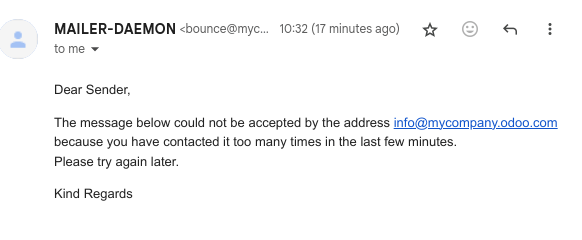
หากต้องการเปลี่ยนพฤติกรรมเริ่มต้น ให้เปิดใช้งาน โหมดนักพัฒนา จากนั้นไปที่ เพื่อเพิ่มพารามิเตอร์สองตัว
สำหรับพารามิเตอร์แรก ให้ป้อน
mail.gateway.loop.minutesเป็น คีย์ และเลือกจำนวนนาทีเป็น ค่า (120เป็นพฤติกรรมเริ่มต้น)สำหรับพารามิเตอร์ที่สอง ให้ป้อน
mail.gateway.loop.thresholdเป็น คีย์ และเลือกจำนวนอีเมลเป็น ค่า (20เป็นพฤติกรรมเริ่มต้น)
อนุญาติพารามิเตอร์ระบบโดเมนนามแฝง
Incoming aliases are set in the NightPOS database to create records by receiving incoming emails. To view aliases set in the NightPOS database, first activate the developer mode. Then, go to .
พารามิเตอร์ระบบต่อไปนี้ mail.catchall.domain.allowed ที่ตั้งค่าด้วยค่าโดเมนนามแฝงที่อนุญาต คั่นด้วยจุลภาค จะกรองอีเมลที่ส่งถึงนามแฝงอย่างถูกต้อง การตั้งค่าโดเมนที่นามแฝงสามารถสร้างตั๋ว ลีด โอกาสทางการขาย ฯลฯ ได้ จะช่วยขจัดผลบวกลวงที่มีเพียงนามแฝงคำนำหน้าเท่านั้น ไม่ใช่โดเมน ในที่อยู่อีเมล
In some instances, matches have been made in the NightPOS database when an email is received with the same alias prefix and a different domain on the incoming email address. This is true in the sender, recipient, and CC email addresses of an incoming email.
Example
When NightPOS receives emails with the commercial prefix alias in the sender, recipient, or
CC email addresses (e.g. commercial@example.com), the database falsely
treats the email as the full commercial alias, with a different domain, and therefore, creates
a ticket/lead/opportunity/etc.
หากต้องการเพิ่มพารามิเตอร์ระบบ mail.catchall.domain.allowed ให้เปิดใช้งาน โหมดนักพัฒนา ก่อน จากนั้นไปที่ คลิก New จากนั้นพิมพ์ mail.catchall.domain.allowed ในฟิลด์ Key
ถัดไป สำหรับฟิลด์ Value ให้เพิ่มโดเมนคั่นด้วยจุลภาค (Save) ด้วยตนเอง และพารามิเตอร์ระบบจะมีผลทันที
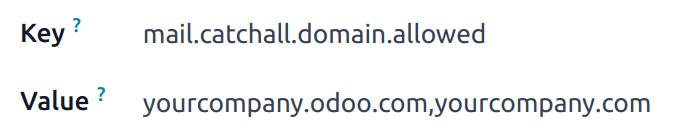
การตรวจจับขาเข้าตามชิ้นส่วนในพื้นที่
When creating a new alias, there is an option to enable Local-part based incoming detection. If enabled, NightPOS only requires the local-part to match for routing an incoming email. If this feature is turned off, NightPOS requires the whole email address to match for routing an incoming email.