
จัดการข้อความขาออก
Sending emails with NightPOS's default configuration
On NightPOS Online and NightPOS.sh, sending and receiving emails works out of the box. No configuration is required.
When a database is created, the subdomain company-name.nightpos.com is used to send and receive
emails. The deliverability is optimized for this subdomain as it uses NightPOS’s DNS configuration.
Example
If the database subdomain is company-name.nightpos.com and all mailing configurations are the
default ones, all emails will be sent from notifications@company-name.nightpos.com.
การกำหนดค่านี้จัดการโดยพารามิเตอร์ระบบ mail.default.from_filter ในกรณีที่โดเมนของผู้ส่งไม่ตรงกับค่าของพารามิเตอร์นี้ จะใช้ที่อยู่แจ้งเตือนแทน สามารถกำหนดค่าหลายค่าในพารามิเตอร์ระบบนี้ได้: คั่นด้วยจุลภาค โดเมน หรือที่อยู่อีเมลแบบเต็มทั้งหมดได้รับอนุญาต เมื่อ กำหนดค่าเซิร์ฟเวอร์อีเมลขาออกแล้ว พารามิเตอร์ระบบจะไม่ถูกพิจารณาอีกต่อไป และค่าที่ใช้คือ FROM filtering ของเซิร์ฟเวอร์อีเมล
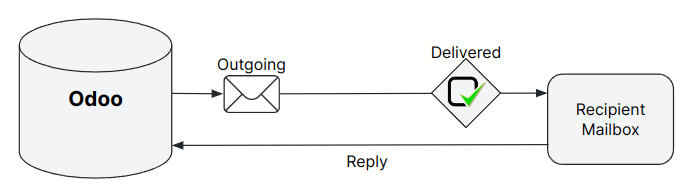
Emails are sent with catchall@company-name.nightpos.com as the reply-to address. In addition,
delivery errors are sent to bounce@company-name.nightpos.com.
Note
ที่อยู่ catchall การตีกลับ และการแจ้งเตือนไม่ทำงานเหมือนกับชื่ออื่นๆ เนื่องจากไม่มีคุณสมบัติในการสร้างบันทึกในฐานข้อมูล อีเมลที่ส่งไปยังชื่อนั้นจะถูกส่งต่อโดยอัตโนมัติและจะตอบกลับไปยังบันทึกที่มีอยู่และเชื่อมโยง หรือจะสร้างบันทึกใหม่ในฐานข้อมูล
การใช้โดเมนที่กำหนดเองเพื่อส่งอีเมล
The database can be configured to use a custom domain, in which case all default email addresses are
built using the custom domain. If the custom domain is company-name.com, the sender address will
be notifications@company-name.com, the reply-to address catchall@company-name.com, and the
bounce address bounce@company-name.com. The custom domain can be utilized when sending emails
either with NightPOS’s email servers or an external one.
ส่วนนี้ถือเป็นการถือครองกรรมสิทธิ์โดเมนที่กำหนดเอง ถ้าไม่เช่นนั้นจะต้องซื้อโดเมนที่กำหนดเองจากผู้ให้บริการจดทะเบียนโดเมน เช่น GoDaddy, Namecheap หรือผู้ให้บริการทางเลือกอื่น
Using a custom domain with NightPOS’s email server
On NightPOS Online or NightPOS.sh, some configurations are mandatory in the custom domain's DNS to ensure good deliverability.
Warning
การกำหนดค่าส่วนใหญ่จะทำที่ฝั่งของผู้ให้บริการโดเมน และอาจต้องมีการกำหนดค่าบางอย่างบนเซิร์ฟเวอร์อีเมลด้วย ต้องมีความรู้ด้านเทคนิคบ้าง
The first step is to configure the SPF and DKIM to be compliant with NightPOS’s mail server.
ขั้นตอนต่อไปคือต้องกำหนดโดเมนที่กำหนดเองเป็นชื่อโดเมนของบริษัท เลือกบริษัท เปิด การตั้งค่า และเพิ่มโดเมนที่กำหนดเองภายใต้ฟิลด์ ชื่อโดเมน
หลังจากเพิ่มชื่อโดเมนแล้ว ให้คลิกไอคอน (internal link) เพื่อกำหนดบริษัทเพิ่มเติมให้กับโดเมนที่กำหนดเองหากจำเป็น เปิดใช้งานโหมด โหมดนักพัฒนา เพื่อปรับเปลี่ยนชื่อเริ่มต้นหากต้องการ:
ชื่อการตีกลับ: กล่องจดหมายที่ใช้สำหรับจับข้อผิดพลาดในการส่ง และกรอก ซองจดหมายสีแดง ในข้อความที่เกี่ยวข้อง
ชื่อ Catchall: กล่องจดหมายเริ่มต้นที่ใช้เพื่อรวมคำตอบทั้งหมดไว้ด้วยกัน
ค่าเริ่มต้นจากชื่อ: ที่อยู่ผู้ส่งเริ่มต้น
Note
เมื่อสร้างชื่อโดเมนแรกแล้ว บริษัททั้งหมดจะใช้โดเมนนั้น หากคุณสร้างบริษัทใหม่ ชื่อโดเมนที่ตั้งไว้โดยอัตโนมัติจะเป็นโดเมนที่มีลำดับความสำคัญต่ำที่สุด (โฆษณาจะแสดงในรายการชื่อโดเมนใน โหมดนักพัฒนา)
ชื่ออีเมลทั้งหมด (เช่น ที่เกี่ยวข้องกับทีม CRM หรือฝ่าย Helpdesk) จะต้องมีกล่องจดหมายที่สอดคล้องกันในเซิร์ฟเวอร์อีเมลโดเมนที่กำหนดเอง

To receive emails in the NightPOS database within the corresponding chatter (CRM, invoices, sales orders, etc.), one of these three methods must be used:
บันทึก MX (ต้องมีความรู้ทางเทคนิคขั้นสูง)
Using a custom domain implies that specific local-parts might be used by NightPOS to send emails.
การส่งอีเมลด้วยเซิร์ฟเวอร์ SMTP ภายนอก
Note
If utilizing your own outgoing mail server, it must be paired with your own domain, as updating the DNS of an NightPOS subdomain is not feasible.
To add an external SMTP server in NightPOS, open Settings, and enable the Use Custom Email Servers option found under the Emails section. Then, click Save at the top of the page to save the changes.
กลับไปที่ส่วน Emails คลิก Outgoing Email Servers จากนั้นคลิก New เพื่อสร้างระเบียนข้อมูลเซิร์ฟเวอร์อีเมลขาออก ฟิลด์ส่วนใหญ่เป็นพารามิเตอร์ทั่วไปที่ใช้ในการตั้งค่าการเชื่อมต่อกับเซิร์ฟเวอร์ SMTP ให้ใช้ค่าที่ผู้ให้บริการอีเมลของคุณระบุ
เมื่อเสร็จแล้ว ให้คลิก ทดสอบการเชื่อมต่อ โปรดทราบว่าการทดสอบการเชื่อมต่อที่ประสบความสำเร็จไม่ได้ยืนยันว่าอีเมลจะถูกส่งออกไป เนื่องจากอาจมีข้อจำกัดบางอย่างที่ยังคงอยู่ที่ฝั่งผู้ให้บริการ ดังนั้นขอแนะนำให้คุณดูเอกสารของผู้ให้บริการ
ค่า Local-part
Below are presented the different local-part values that can be used by NightPOS to send emails. It might be required to whitelist them in your mail server:
ชื่อโดเมนการตีกลับ (ค่าเริ่มต้น =
การตีกลับ)ชื่อโดเมนค่าเริ่มต้นจาก (ค่าเริ่มต้น =
การแจ้งเตือน)The default admin address
admin@company-name.nightpos.comor, if changed, the new value),The default NightPOSbot address
nightposbot@company-name.nightpos.comor, if changed, the new value),เฉพาะ จาก ที่กำหนดไว้ในแคมเปญอีเมลมาร์เก็ตติ้ง
เฉพาะ จาก ที่สามารถกำหนดได้ในเทมเพลตอีเมล
การตั้งค่าเซิร์ฟเวอร์ที่แตกต่างกันสำหรับอีเมลธุรกรรมและอีเมลกลุ่ม
เซิร์ฟเวอร์เมลส่วนบุคคล
Transactional emails and mass mailings can be sent using separate email servers in NightPOS. Doing so means day-to-day emails, quotations, or invoices sent to clients will be handled as transactional emails. Mass mailing emails, including the sending of batches of invoices or quotations, will be managed by the Marketing Automation or Email Marketing application.
Example
คุณสามารถใช้บริการเช่น Gmail, Amazon SES หรือ Brevo สำหรับอีเมล์ธุรกรรม และบริการเช่น Mailgun, Sendgrid หรือ Mailjet สำหรับการส่งอีเมลกลุ่ม
ขั้นแรก ให้เปิดใช้งาน โหมดนักพัฒนา แล้วไปที่ จากนั้น เพิ่มระเบียนเซิร์ฟเวอร์อีเมลขาออก 2 รายการ หนึ่งรายการสำหรับเซิร์ฟเวอร์อีเมลธุรกรรม และอีกรายการสำหรับเซิร์ฟเวอร์ส่งเมลจำนวนมาก ป้อนค่า ลำดับความสำคัญ ที่ต่ำกว่าสำหรับเซิร์ฟเวอร์ส่งเมลจำนวนมาก (เช่น 1) เพื่อให้อีเมลธุรกรรมได้รับความสำคัญมากขึ้น
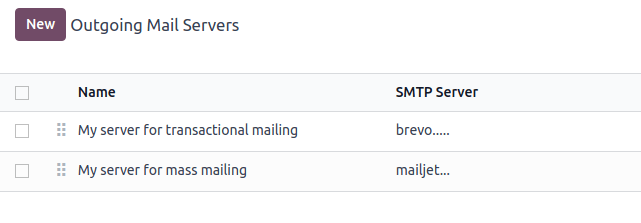
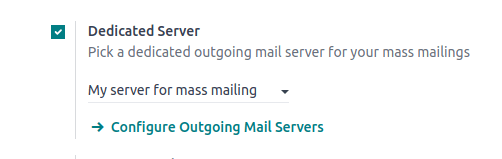
Now, go to , enable Dedicated Server, and select the appropriate email server. NightPOS uses the server with the lowest priority value for transactional emails, and the server selected here for mass mailings.
ตัวกรอง จาก
Important
ขอแนะนำ ให้กำหนดค่าการกรองจากบนเซิร์ฟเวอร์เมลขาออกตามคำแนะนำของผู้ให้บริการของคุณ
The FROM Filtering field allows for the use of a specific outgoing email server depending on the From email address or domain that NightPOS is sending on behalf of. The value must be a domain or a complete address that matches the sender’s email address and is trusted on the outgoing mail server provider's side.
หากไม่ใช้ตัวกรองจาก อีเมลจะถูกส่งออกไปโดยใช้ที่อยู่การแจ้งเตือน
Warning
เซิร์ฟเวอร์เมลขาออกบางตัวต้องมีการกำหนดค่าตัวกรอง จาก โดยเฉพาะ
When an email is sent from NightPOS, the following sequence is used to choose the outgoing email server:
First, NightPOS searches for a server that has the same FROM filtering value as the From value (i.e., email address) defined in the outgoing email. This configuration is ideal if all users of a company share the same domain but have different local-parts.
Example
หากที่อยู่อีเมลของผู้ส่งคือ test@example.com จะใช้ได้เฉพาะเซิร์ฟเวอร์อีเมลที่มีค่าตัวกรอง จาก เท่ากับ test@example.com หรือ example.com เท่านั้น
If no server is found based on the first criteria, NightPOS looks for the first server without a FROM filtering value set. The email will be overridden with the notification address.
If no server is found based on the second criteria, NightPOS uses the first server, and the email will be overridden with the notification address.
Note
To determine which server is first, NightPOS uses the priority value (the lower the value is, the higher the priority is). Failing to do so, the first server is determined by the servers' names, using alphabetical order.
If there is no mail server, NightPOS relies on the system parameter value.
It is also possible to use NightPOS's mail server for transactional emails in addition to mass mailings.
Using an external email server and NightPOS’s default server
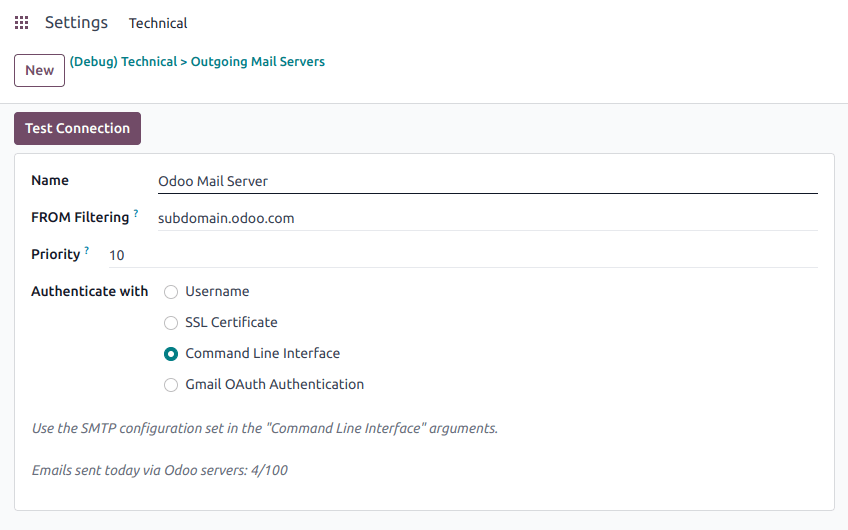
On NightPOS Online and NightPOS.sh, databases are started with NightPOS's SMTP server. If no outgoing mail server is set, the default NightPOS's SMTP server will be used.
Example
If an outgoing mail server is used simultaneously with NightPOS’s default server (CLI), the FROM filter of the outgoing mail server must contain a custom domain, and the FROM filter of the CLI must contain NightPOS’s subdomain. If there is no FROM filtering, the email will go out using the notification address.
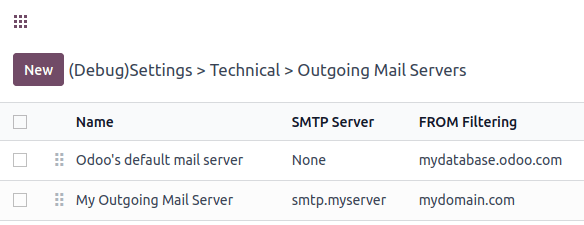
Note
On NightPOS Online, the command line interface is equivalent to the default NightPOS mail server, using the same limit as if there was no outgoing mail server in place.
Tip
On NightPOS Online, the page also shows your daily email usage and your daily limit. On NightPOS.sh, you need to check on the monitor page the number of outgoing emails that were sent.
Note
On NightPOS.sh, to use the command-line interface, an outgoing mail server can be configured on the configuration file.
Warning
NightPOS’s mail server is meant for transactional emails and small-scale marketing campaigns. The daily limit depends on the database type and the applications used.
การใช้โดเมนที่กำหนดเองกับเซิร์ฟเวอร์อีเมลภายนอก
Similar to the previous chapter, proper configuration might be needed to ensure that the external email server is allowed to send emails using your custom domain. Refer to your provider’s documentation to properly set up the relevant records (SPF, DKIM, and DMARC). A list of the most common providers is available.
Note
DNS configuration is required when you use your own domain. If an external outgoing mail server is used, configuring the records as described in the NightPOS DNS configuration for our mail servers documentation will not have the desired effect, as it is independent of NightPOS when using a custom email server. NightPOS does not allow the configuration of NightPOS's subdomain.
ข้อจำกัดของพอร์ต
Port 25 is blocked for security reasons on NightPOS Online and NightPOS.sh. Try using port 465, 587, or 2525 instead.
นามแฝงโดเมน
The catchall domain is company-specific. By default, all companies share NightPOS’s subdomain (e.g.,
company-name.nightpos.com), but each company may have its own custom email domain.
เมื่อเปิดใช้งาน โหมดนักพัฒนา ตัวเลือกชื่อโดเมนจะพร้อมใช้งานโดยไปที่
Warning
การแก้ไขชื่อโดเมนจะต้องดำเนินการอย่างระมัดระวัง หากมีการเปลี่ยนแปลงชื่อใดชื่อหนึ่ง (bounce, catchall, default from) อีเมลก่อนหน้าทั้งหมดที่ไม่ได้เปลี่ยนเส้นทางไปยังชื่อใหม่จะถูกลบไป
สามารถกรอกฟิลด์ ค่าเริ่มต้นจากชื่อ ด้วยส่วนโลคัลของที่อยู่อีเมล (โดยค่าเริ่มต้นคือ การแจ้งเตือน) หรือที่อยู่อีเมลแบบเต็ม กำหนดค่าเพื่อกำหนดส่วนหัว จาก ของอีเมลของคุณ หากใช้ที่อยู่อีเมลแบบเต็ม อีเมลขาออกทั้งหมดจะถูกเขียนทับด้วยที่อยู่นี้
ระบบแจ้งเตือน
เมื่อส่งอีเมลจากช่องแชท ลูกค้าสามารถตอบกลับอีเมลนั้นได้โดยตรง หากลูกค้าตอบกลับอีเมลโดยตรง คำตอบจะถูกบันทึกในช่องแชทดียวกัน จึงทำหน้าที่เป็นเธรดข้อความที่เกี่ยวข้องกับบันทึกนั้น
Upon receiving the reply, NightPOS then uses the subscribed followers (based on the subscribed subtypes) to send them a notification by email, or in the NightPOS inbox, depending on the user’s preferences.
Example
If a customer with the email address “Mary” <mary@customer.example.com> makes a direct reply to
an email coming from the NightPOS database, NightPOS's default behavior is to redistribute the email's
content to all other followers within the thread.
As Mary’s domain does not belong to the alias domain, NightPOS overrides the email address and uses
the notification email address to notify the followers. This override depends on the
configuration done in the database. By default, on NightPOS Online and NightPOS.sh, the email FROM
address will be overridden with the value notifications@company-name.nightpos.com instead of
mary@customer.example.com.
The address is constructed using the name of the sender and
{alias domain, default from alias}`@`{alias domain, domain name}, by default,
notifications@company-name.nightpos.com.
การใช้ที่อยู่อีเมลที่ไม่ซ้ำกันสำหรับอีเมลขาออกทั้งหมด
เพื่อบังคับที่อยู่อีเมลที่ใช้ส่งอีเมล ให้เปิดใช้งาน โหมดนักพัฒนา (โหมดแก้ไขข้อบกพร่อง) และไปที่ ในส่วน นามแฝงจากค่าเริ่มต้น ให้ใช้ส่วนท้องถิ่นหรือที่อยู่อีเมลแบบสมบูรณ์เป็นค่า
Warning
ถ้าใช้ ที่อยู่ที่สมบูรณ์ เป็นค่า ค่าเริ่มต้นจากชื่อ อีเมลขาออก ทั้งหมด จะถูกเขียนทับด้วยที่อยู่นี้