
การซื้อในแอป (IAP)
In-app purchases (IAP) are optional services that enhance NightPOS databases. Each service provides its own specific features and functionality. A full list of services is available on the NightPOS IAP Catalog.
Example
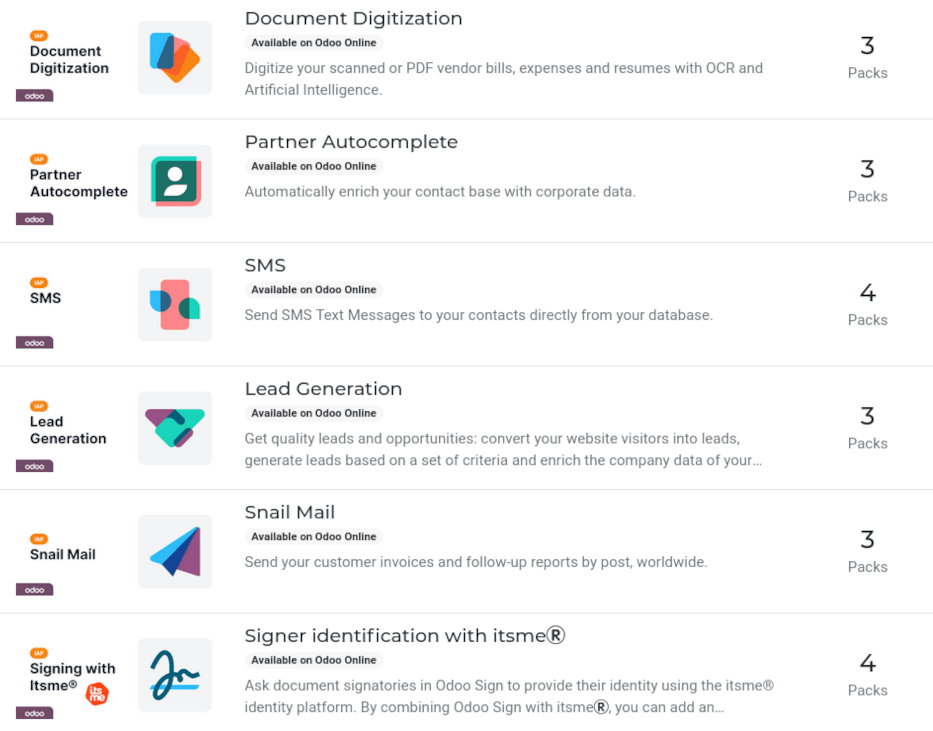
บริการ SMS ส่งข้อความไปยังรายชื่อผู้ติดต่อโดยตรงจากฐานข้อมูล และบริการ Documents Digitization แปลงใบแจ้งหนี้ของผู้ขาย บัญชีรายจ่าย และเรซูเม่ที่สแกนหรือเป็น PDF ให้เป็นดิจิทัลด้วยการรู้จำอักขระด้วยแสง (OCR) และปัญญาประดิษฐ์ (AI)
IAP services do not need to be configured or set up before use. NightPOS users can click on the service in the app to activate it. However, each service requires its own prepaid credits, and when they run out, users must buy more in order to keep using it.
Note
Enterprise NightPOS users with a valid subscription get free credits to test IAP features before deciding to purchase more credits for the database. This includes demo/training databases, educational databases, and one-app-free databases.
บริการ IAP
IAP services are provided by NightPOS, as well as third-parties, and have a wide range of uses.
The following IAP services are offered by NightPOS:
การแปลงเอกสารเป็นดิจิทัล: แปลงใบแจ้งหนี้จากผู้ขาย ค่าใช้จ่าย และประวัติย่อที่สแกนหรือเป็น PDF เป็นดิจิทัลด้วย OCR และ AI
การกรอกข้อมูลพาร์ทเนอร์อัตโนมัติ: กรอกข้อมูลผู้ติดต่อด้วยข้อมูลองค์กรโดยอัตโนมัติ
SMS: ส่งข้อความ SMS ไปยังผู้ติดต่อโดยตรงจากฐานข้อมูล
การสร้างลูกค้าเป้าหมาย: สร้างลูกค้าเป้าหมายตามเกณฑ์ที่กำหนด และแปลงผู้เยี่ยมชมเว็บไซต์ให้เป็นลูกค้าเป้าหมายและโอกาสที่มีคุณภาพ
Snailmail: ส่งใบแจ้งหนี้ลูกค้าและรายงานติดตามทางไปรษณีย์ทั่วโลก
Signer identification with itsme®: Ask document signatories in NightPOS Sign to provide their identity using the itsme identity platform, which is available in Belgium and the Netherlands.
For more information on every service currently available (offered from developers other than NightPOS), visit the NightPOS IAP Catalog.
ใช้บริการ IAP
IAP services are automatically integrated with NightPOS, and do not require users to configure any settings. To use a service, interact with it wherever it appears in the database.
Example
ขั้นตอนต่อไปนี้มุ่งเน้นไปที่บริการ SMS IAP ที่ใช้จากบันทึกของผู้ติดต่อ
ทำได้โดยคลิกไอคอน SMS ภายในฐานข้อมูล
One way to utilize the SMS IAP service with NightPOS is showcased in the following steps:
ขั้นแรก ไปที่ และคลิกที่ผู้ติดต่อที่มีหมายเลขโทรศัพท์มือถือที่ป้อนไว้ในช่อง โทรศัพท์ หรือ มือถือ ของแบบฟอร์มผู้ติดต่อ
ถัดไป ค้นหาไอคอน SMS ที่ปรากฏทางด้านขวาของช่อง โทรศัพท์ หรือ มือถือ คลิกไอคอน SMS แล้วหน้าต่างป๊อปอัป ส่งข้อความ SMS จะปรากฏขึ้น
Type a message in the Message field of the pop-up window. Then, click the Send SMS button. NightPOS then sends the message, via SMS, to the contact, and logs what was sent in the chatter of the contact's form.
Upon sending the SMS message, the prepaid credits for the SMS IAP service are automatically deducted from the existing credits. If there are not enough credits to send the message, NightPOS prompts the user to purchase more.
ดูเพิ่มเติม
For more information on how to use various IAP services, and for more in-depth instructions related to SMS functionality in NightPOS, review the documentation below:
เครดิต IAP
Every time an IAP service is used, the prepaid credits for that service are spent. NightPOS prompts the purchase of more credits when there are not enough credits left to continue using a service. Email alerts can also be set up for when credits are low.
Credits are purchased in Packs from the NightPOS IAP Catalog, and pricing is specific to each service.
Example
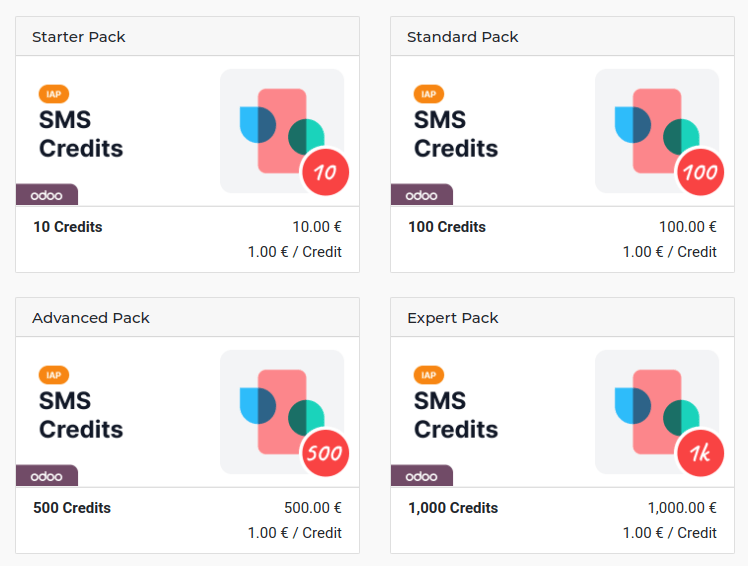
The SMS service has four packs available, in denominations of:
Starter Pack: 10 เครดิต
Standard Pack: 100 เครดิต
Advanced Pack: 500 เครดิต
Expert Pack: 1,000 เครดิต
จำนวนเครดิตที่ใช้ไปจะขึ้นอยู่กับความยาวของ SMS และประเทศปลายทาง
สำหรับข้อมูลเพิ่มเติม โปรดดูที่เอกสารประกอบ ราคา SMS และคำถามที่พบบ่อย
ซื้อเครดิต
หากไม่มีเครดิตเพียงพอที่จะทำงาน ฐานข้อมูลจะแจ้งให้ซื้อเครดิตเพิ่มเติมโดยอัตโนมัติ
Users can check the current balance of credits for each service, and manually purchase more credits, by navigating to the , and beneath the NightPOS IAP setting, click View My Services.
การทำเช่นนี้จะแสดงหน้า IAP Service ซึ่งแสดงรายการบริการ IAP ต่างๆ ในฐานข้อมูล จากที่นี่ ให้คลิกที่บริการ IAP เพื่อเปิดหน้า Account Information ซึ่งสามารถซื้อเครดิตเพิ่มเติมได้
ซื้อเครดิตด้วยตนเอง
To manually buy credits in NightPOS, follow these steps:
First, go to the and type IAP in the search bar.
Alternatively users can scroll down to the Contacts section. Under the
Contacts section, where it says NightPOS IAP, click View My
Services.
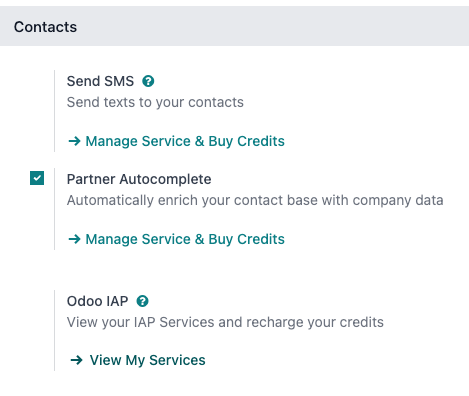
การดำเนินการดังกล่าวจะแสดงหน้า บัญชี IAP ซึ่งแสดงรายการบริการ IAP ต่างๆ ในฐานข้อมูล จากที่นี่ คลิกที่บริการ IAP เพื่อเปิดหน้า ข้อมูลบัญชี ซึ่งสามารถซื้อเครดิตเพิ่มเติมได้
บนหน้า ข้อมูลบัญชี คลิกปุ่ม ซื้อบัตรเครดิต การดำเนินการดังกล่าวจะโหลดหน้า ซื้อเครดิตสำหรับ (บัญชี IAP) ในแท็บใหม่ จากที่นี่ คลิก ซื้อ บนแพ็กเครดิตที่ต้องการ จากนั้นทำตามขั้นตอนเพื่อป้อนรายละเอียดการชำระเงินและยืนยันคำสั่งซื้อ
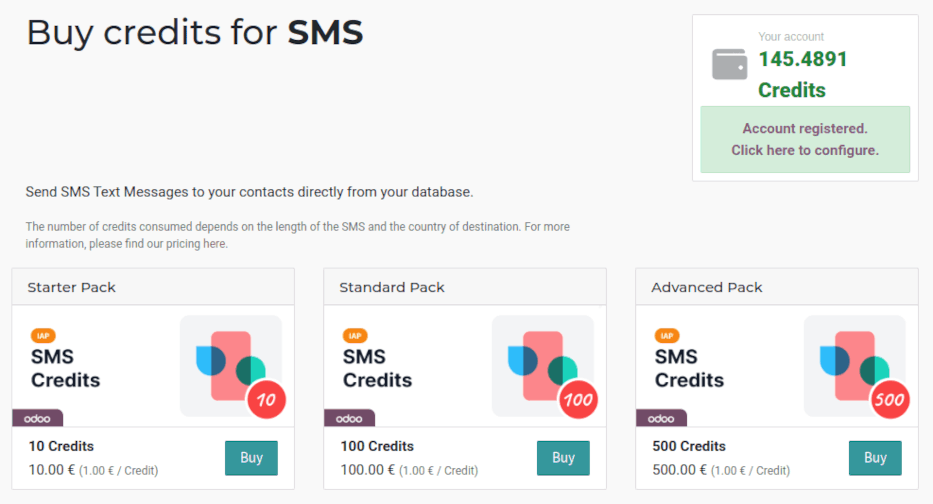
เมื่อทำธุรกรรมเสร็จสิ้น เครดิตจะพร้อมใช้งานในฐานข้อมูล
การแจ้งเตือนเครดิตต่ำ
สามารถรับการแจ้งเตือนเมื่อเครดิตเหลือน้อย เพื่อหลีกเลี่ยงการหมดเครดิตขณะใช้บริการ IAP ในการดำเนินการนั้น ให้ทำตามขั้นตอนนี้:
Go to the , and type IAP in the search bar.
Under the Contacts section, where it says NightPOS IAP, click View My
Services.
บัญชี IAP ที่มีอยู่จะปรากฏในมุมมองรายการบนหน้า บัญชี IAP จากที่นี่ คลิกที่บัญชี IAP ที่ต้องการเพื่อดูหน้า ข้อมูลบัญชี ของบริการนั้น
ตั้งค่า ขีดจำกัดการแจ้งเตือนทางอีเมล เป็นจำนวนเครดิตที่ควรกระตุ้นการแจ้งเตือนเครดิตต่ำเมื่อยอดคงเหลือลดลงต่ำกว่านั้น จากนั้นเลือกผู้ใช้ที่ควรได้รับการแจ้งเตือนทางอีเมลโดยใช้ฟิลด์ ผู้รับการแจ้งเตือนทางอีเมล